Take ownership of a backup set – SAFE Backup

Take ownership of a backup set – SAFE Backup

You will need to do this when replacing (or renaming) and machine with anther, the software needs to know that the set now needs to run on another machine.

Login to the backup client, select “Backup Sets” and select the backup set you wish to take ownership of.


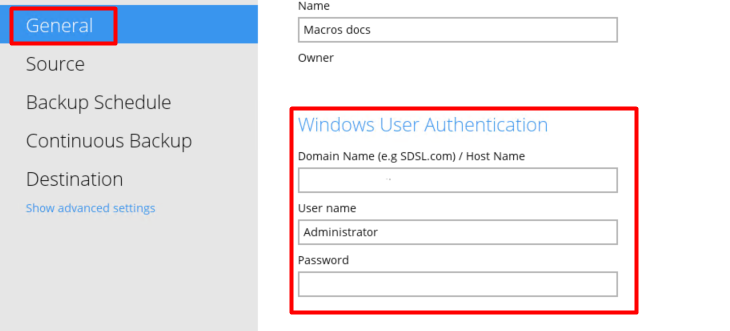
Note: If the Windows creds have changed on the new machine you may need to update then on the “General” page before you can continue.
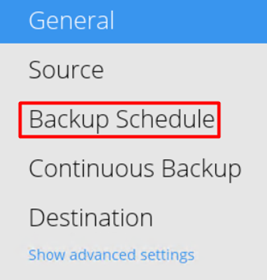
Select “Backup Schedule” on the left.
And turn the schedule “on” via the toggle.
You will then have to confirm on the message to take ownership.

And you will see the schedule is now on, running from this machine.

Be sure to press “Save”.

It is always worth checking that the new sources match the old ones - a guide for this is here – any sources that show in red mean they are no longer there.


    • Related Articles

    • View the debug.log files – SAFE Backup

      You will only really need to view this in the case of a missed backup, as this log will tell you when the next backup will run. To view the scheduler log, open file explorer and go to the C drive, open Users and select the user account that the ...
    • How to Create a Business Cloud Backup Set - SAFE Backup

      To create a backup set you need to login to the backup client, on the dashboard select the "Backup Sets" option. If you have no backup sets you will see the below, press "Add new backup set". If you do have a backup set already you can select "Add". ...
    • How to Create a Single User Cloud Backup Set - SAFE Backup

      To create a backup set you need to login to the backup client, on the dashboard select the "Backup Sets" option. If you have no backup sets you will see the below, press "Add new backup set". From here you can name your set and select the backup type ...
    • Stop a running backup – SAFE Backup

      If a backup is running and you want to stop it, open system tray and you will see the SAFE Backup icon, it will be spinning if the backup is running. Right click on this and go to “Stop Running Backup” – you will then need to select the set name that ...
    • How to Add a New Destination in the Backup Client - SAFE Backup

      When creating a new backup set or editing an existing one, you may want to add a new destination to store the backup in. Login to the backup client and select "Backup Sets". Then select the backup set you wish to edit. Select "Destination" in the ...